
Availability of Jetonbank payments is subject to jurisdictional restrictions and the currency of your trading account. Please refer to your client portal for details of the payment methods available to you.
What is Jetonbank?
Jetonbank Wallet gives you your own, personal digital e-wallet providing you secure and fast money transfers, money exchange and payment processing. With Jeton Wallet, you can deposit, withdraw, send, pay and exchange money easily in one platform with over 70 global and local payment methods, supporting over 50 currencies.
Making a deposit
To deposit with Jetonbank's wallet;
-
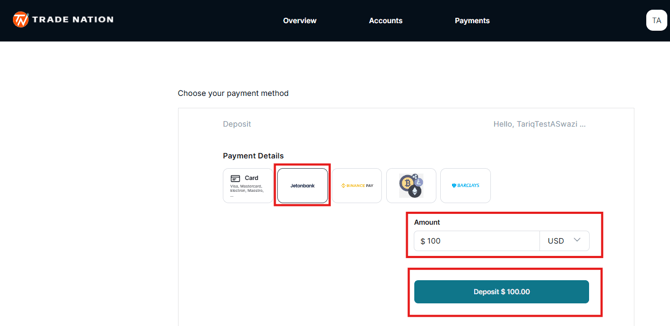
Go to your Deposit page and select "Jetonbank".
-
Insert the amount you that you would like to deposit.
-
Select the Deposit button.
-
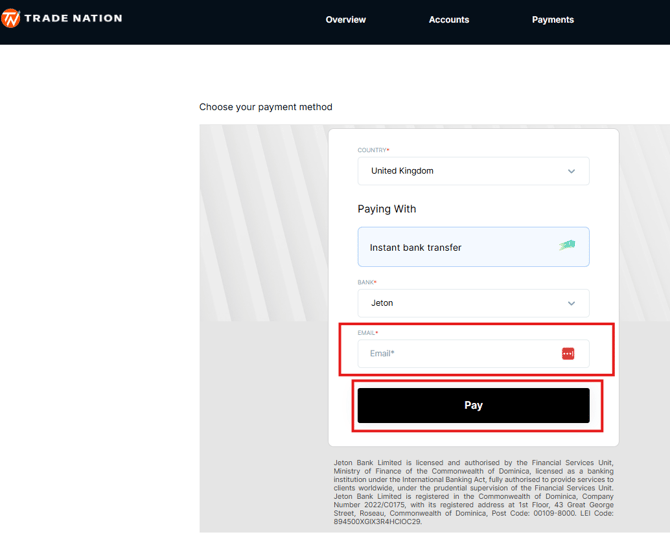
Enter your email address and click the 'Pay' button.
-
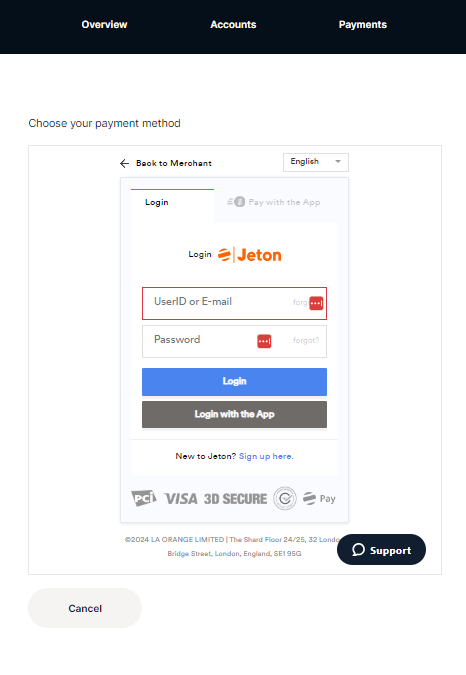
Log in to your existing Jetonbank account by entering your username and password or scan the QR Code from the Jetonbank app.
-
If you do not have a Jetonbank account, please complete the sign up process and follow the instructions to complete your deposit.
-
Once the payment is approved, the funds should be reflect on your trading account automatically.